
SD card - the card reading
8.6.2018
We will go through the data stored in the card that we prepared in advance. We will use the wiring and functions introduced in the previous chapter. To read and view the data I will use this code:
BYTE data[512];
unsigned long BLOCK_NUMBER=0;

sprintf(s,"\nreading block %lu\n",BLOCK_NUMBER);
sendSerialString(s);

readBlockSD(BLOCK_NUMBER,data);

for (int i=0;i<10;i++)
{
  for (int j=0;j<50;j++)
  {
    sprintf(s,"%02X ",data[i*50+j]);
    sendSerialString(s);
  }
  sendSerialString("\n");
}

for (int j=0;j<12;j++)
{
  sprintf(s,"%02X ",data[500+j]);
  sendSerialString(s);
}
What happens is that data variable is filled with the desired sector bytes and then the bytes are sent over the serial line in hexadecimal format on 10 rows 50 bytes each plus 12 bytes on the last row.
Master Boot Record (MBR)
The first sector (the sector number 0) of the card contains the Master Boot Record (MBR). Let's look at it - we will read the cluster number 0 data:
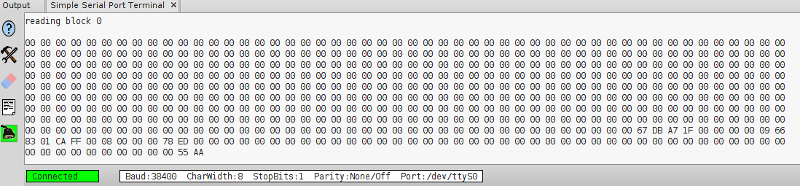
First 446 bytes are of no interest for us. After those bytes the data for 4 partitions each of 16 bytes follow. The last two bytes have values 0x55 0xAA. We can also see that only the first partition is not entirely filled with zeroes. Good to know that values are stored in the little-endian format - LSB to MSB layout. Take a look at the 16 bytes of the first partition:
00 00 09 66 83 01 CA FF 00 08 00 00 00 78 ED 00
Skip the first 4 bytes. The 5th byte contains the partition type. In our case we have 0x83 that is Linux. Skip the next 3 bytes. The following 4 bytes carry information about the number of the first sector of the partition. We see 00 08 00 00 that is with little-endian format in mind the hex value 0x00000800 that is 2048. The last four bytes contain the number of sectors in the partition. The sequence of bytes 00 78 ED 00 is 0x00ED7800 = 15562752. We can count the size of the partition since we know the size of the cluster is 512 bytes. The partition then contains 512 * 15562752 B = 7968129024 B = 7781376 KB = 7599 MB = 7.42 GB.
Volume Boot Record (VBR)
As we know the partition starts in the sector number 2048 so we display it's content.
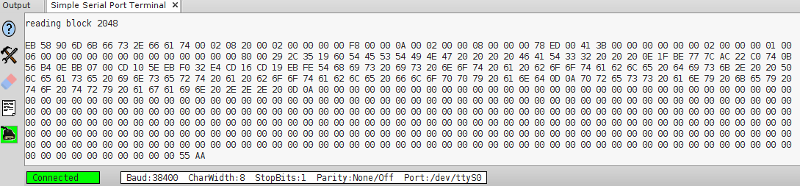
The first 36 bytes is the BIOS Parameter Block (BPB):
EB 58 90 6D 6B 66 73 2E 66 61 74 00 02 08 20 00 02 00
00 00 00 F8 00 00 0A 00 02 00 00 08 00 00 00 78 ED 00
Skip the first 3 bytes. The next 8 bytes should be the DOS version or something like that. We have 6D 6B 66 73 2E 66 61 74 that is test string "mkfs.fat" which is the command's name I used to create the file system. The next 2 bytes 0x0200 = 512 - size of the sector in bytes. The next byte is the number of sectors constituting the cluster (allocation unit): 0x08. Then 0x20 = 32 - the number of reserved sectors. The number of FAT tables in one byte follows: 0x02. Skip next 11 bytes. The following 4 bytes represent the number of hidden sectors 0x0800 = 2048. Finally the last 4 bytes contain the number of sectors in the partition - 00 78 ED 00.
The BPB is followed by the Extended Boot Record (EBPB) that means additional 54 bytes in case of FAT32. Here is EBPB:
41 3B 00 00 00 00 00 00 02 00 00 00 01 00 06 00 00 00 00 00 00 00 00 00 00 00 00
00 80 00 29 2C 35 19 60 54 45 53 54 49 4E 47 20 20 20 20 46 41 54 33 32 20 20 20
The first 4 bytes contain the size of the FAT in the sector unit: 0x3B41 = 15169. Skip 4 bytes. The next 4 bytes hold the number of the first cluster in the root directory: 0x02. Skip 18 bytes. The next byte must be 0x28 or 0x29 - we have 0x29. Skip 4 bytes. The name of the partition in the 11 bytes (with added spaces if needed): 54 45 53 54 49 4E 47 20 20 20 20 that is text string "TESTING ". The last 8 bytes should be "FAT32 ": 46 41 54 33 32 20 20 20.
File Allocation Table (FAT)
We have found that FAT contains 15169 sectors that is 7.4 MB. To get the address (the sector number) of the FAT beginning we sum the number of the first partition sector and the number of reserved sectors. The FAT then begins in the sector number 2048 + 32 = 2080. We will display this sector:

The second copy of the table lies immediately after the first one and begins in sector number 2080 + 15169 = 17249:
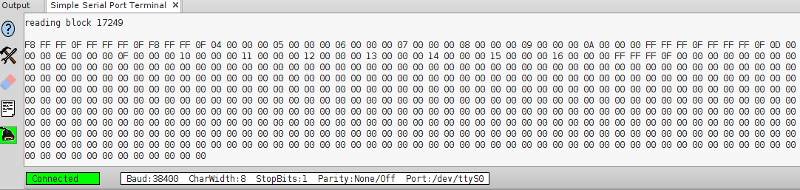
We can see that both tables are indentical.
The records in the table have 4 bytes each. Take a look at the first 4 records:
F8 FF FF 0F FF FF FF 0F F8 FF FF 0F 04 00 00 00
As we know the root directory begins in the cluster number 2. In the FAT we see 0x0FFFFFF8 - this value means that all the data of the root record is stored in the cluster number 2. The record of the cluster number 3 in the FAT holds the value 0x04 so whatever is stored in the cluster number 3 continues in the cluster number 4. If we followed this sequence we would find all the clusters that contain the data of the specified file or directory. The sequence would end in the record with value FF FF FF 0F that indicates the last cluster. The number of the first cluster of the file or directory is located in the directory record into which the object logically belongs.
The root directory
The root directory lies just after the second copy of the FAT. It's sector number is 17249 + 15169 = 32418. This sector is also the beginning of the cluster number 2. The root directory sector:
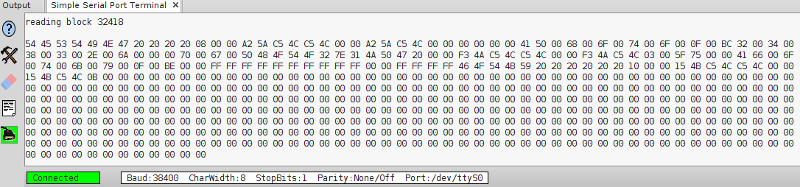
Each record in the directory is 32 bytes long. We have 5 records in our root directory (rows length adjusted to 32 bytes):
54 45 53 54 49 4E 47 20 20 20 20 08 00 00 A2 5A C5 4C C5 4C 00 00 A2 5A C5 4C 00 00 00 00 00 00
41 50 00 68 00 6F 00 74 00 6F 00 0F 00 BC 32 00 34 00 38 00 33 00 2E 00 6A 00 00 00 70 00 67 00
50 48 4F 54 4F 32 7E 31 4A 50 47 20 00 00 F3 4A C5 4C C5 4C 00 00 F3 4A C5 4C 03 00 5F 75 00 00
41 66 00 6F 00 74 00 6B 00 79 00 0F 00 BE 00 00 FF FF FF FF FF FF FF FF FF FF 00 00 FF FF FF FF
46 4F 54 4B 59 20 20 20 20 20 20 10 00 00 15 4B C5 4C C5 4C 00 00 15 4B C5 4C 0B 00 00 00 00 00
Let's look closer at the 3rd record which is the short name of the file "Photo2483.jpg":
50 48 4F 54 4F 32 7E 31 4A 50 47 20 00 00 F3 4A C5 4C C5 4C 00 00 F3 4A C5 4C 03 00 5F 75 00 00
The first 11 bytes 50 48 4F 54 4F 32 7E 31 4A 50 47 represent short file name with text string "PHOTO2~1JPG". The next byte 0x20 is file's attribute. Skip 2 bytes. 0x4AF3 is creation time, 0x4CC5 is creation date, 0x4CC5 is the last access date. In the next 2 bytes there are the highest 16 bits of the first cluster number that is 0x0. 0x4AF3 is the last modification time, 0x4CC5 is the last modification date. In the next 2 bytes there are the lowest 16 bits of the first cluster number that is 0x03. Finally the last 4 bytes contain the file size in bytes 0x755F = 30047 B.
A few words to the time and date format used in the records. The time: 5 bits hours, 6 bits minutes, 5 bits seconds. The date: 7 bits year, 4 bits month, 5 bits day.
The second record is the long name of the same file:
41 50 00 68 00 6F 00 74 00 6F 00 0F 00 BC 32 00 34 00 38 00 33 00 2E 00 6A 00 00 00 70 00 67 00
The first byte is the ordinal number of the long name records belonging to same object. Following 10 bytes with 2-bytes long name's characters 50 00 68 00 6F 00 74 00 6F 00 that is text "Photo". 0x0F is attribute saying that this record is the long name. Skip one byte. The next byte is the checksum computed over the short name. The next 12 bytes 32 00 34 00 38 00 33 00 2E 00 6A 00 as the text "2483.j". The following 2 bytes should be zeroes. The last 4 bytes 70 00 67 00 as text "pg".
As it is stated in the page https://www.win.tue.nl/~aeb/linux/fs/fat/fat-1.html the ckecksum is calculated this way:
int i;
unsigned char sum = 0;

for (i = 0; i < 11; i++)
{
  sum = (sum >> 1) + ((sum & 1) << 7);
  sum += name[i];
}
In the code above the sum variable holds the final ckecksum and the name variable contains the short name of the file.
The subdirectory
The 5th record is the short name of the "fotky" directory. The sequence 46 4F 54 4B 59 20 20 20 20 20 20 is the text "FOTKY ". 0x10 meanas the directory attribute. The directory starts in the cluster number 0x0B = 11. We want to see its content. For this we need to get the sector number from the cluster number: 32418 + (11 - 2) * 8 = 32490.
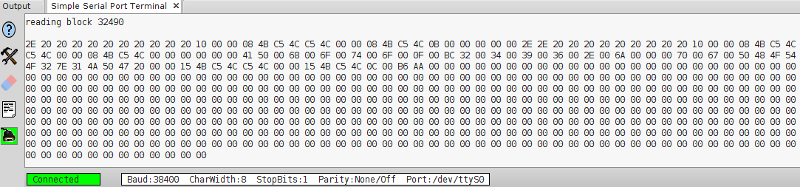
The directory contains 4 records:
2E 20 20 20 20 20 20 20 20 20 20 10 00 00 08 4B C5 4C C5 4C 00 00 08 4B C5 4C 0B 00 00 00 00 00
2E 2E 20 20 20 20 20 20 20 20 20 10 00 00 08 4B C5 4C C5 4C 00 00 08 4B C5 4C 00 00 00 00 00 00
41 50 00 68 00 6F 00 74 00 6F 00 0F 00 BC 32 00 34 00 39 00 36 00 2E 00 6A 00 00 00 70 00 67 00
50 48 4F 54 4F 32 7E 31 4A 50 47 20 00 00 15 4B C5 4C C5 4C 00 00 15 4B C5 4C 0C 00 B6 AA 00 00
The attribute 0x10 of the first record is saying that it is the directory. It has 0x2E in it's name which is the dot character "." - such a record represents the actual directory itself.
The second record which is also a directory has two dots ".." in the name. It says this record is the parental directory in the directories hierarchy. The first cluster number is 0 indicating that the parental directory is the root directory.
The third record is the long name of the file.
The file's content
The fourth record is the short name of the "Photo2496.jpg" file. This file's size is 0xAAB6 = 43702 B and it begins in the cluster number 0x0C = 12 that is the sector number 32418 + (12 - 2) * 8 = 32498. We know that the file uses 43702/(512 * 8) = 10.7 clusters. Let's read only the first sector of the file:
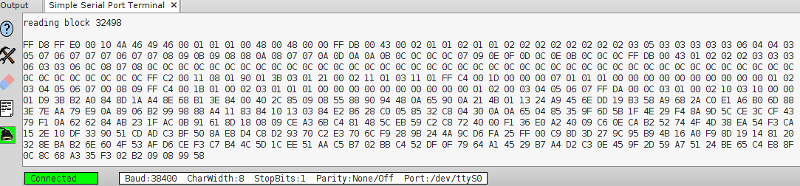
We will take a look at the first 20 bytes of the file:
FF D8 FF E0 00 10 4A 46 49 46 00 01 01 01 00 48 00 48 00 00
What we see is the JPG file header. Beginning with 7th byte there is the sequence 4A 46 49 46 00 which is text "JFIF" ending with zero.